

Download BitLord – Free Torrent Downloader, Stream & Share
Overview
BitLord is a free peer‑to‑peer (P2P) client that blends classic torrent downloading with built‑in media streaming. Developed by the House of Life team, the software runs on both desktop (Windows, macOS) and mobile (Android, iOS) platforms, offering a single solution for users who want to fetch large files while watching them instantly. Unlike many open‑source alternatives, BitLord is proprietary and supported by non‑intrusive advertisements, which keeps the price tag at zero dollars.
The application is built on Python and Qt, leveraging the powerful libtorrent‑rasterbar C++ library for fast peer connections, while its internal Chromium‑based browser simplifies torrent searches directly inside the client. A built‑in VLC engine enables seamless video playback, and Chromecast support lets you project movies to your TV without extra steps. Integrated OpenSubtitles gives you multilingual subtitles on the fly, and playlist management helps you keep your media library tidy.
Though the name BitLord has occasionally been confused with malicious files, the official installer is safe when downloaded from the legitimate website. Pairing BitLord with a reputable VPN such as NordVPN adds an extra layer of privacy for users who are concerned about torrent‑related exposure. Overall, BitLord delivers a feature‑rich, ad‑supported torrent experience that is especially attractive for users who value instant streaming during downloads.
Features, Installation & Compatibility
Key Features
- Instant streaming while downloading: Play video files as soon as enough data is buffered, using an integrated VLC player.
- Built‑in torrent search: Search for movies, music, e‑books, and software without leaving the client.
- Chromecast support: Cast any playing video to a TV or compatible display with a single click.
- OpenSubtitles integration: Load subtitles in dozens of languages directly from the interface.
- Playlist management: Organize torrents into custom playlists for easy access and batch control.
- Cross‑platform UI: Consistent look and feel on Windows, macOS, Android, and iOS.
- Ad‑supported free model: No subscription fees; occasional ads keep the core features completely free.
- Secure download links: The client verifies magnet links and .torrent files to reduce the risk of malicious payloads.
Installation & First‑time Setup
Getting BitLord up and running is straightforward. Begin by visiting the official BitLord website and downloading the installer that matches your operating system. For Windows, run the .exe file; macOS users will receive a .dmg package, while Android and iOS users can install the app from their respective stores.
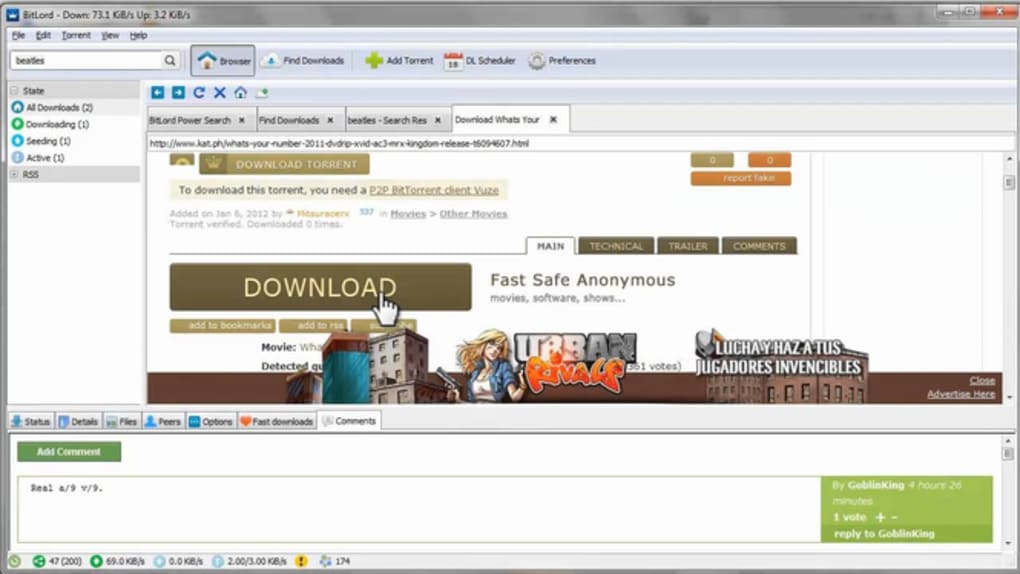
During installation, the wizard asks whether you’d like BitLord to associate with .torrent files and magnet links – enabling this option streamlines future downloads. After the program launches, you’ll be greeted by a clean dashboard that displays a built‑in search bar at the top, a list of active torrents in the center, and a quick‑access toolbar for streaming, adding subtitles, or casting to Chromecast. The first time you open the client, you’ll be prompted to accept the privacy policy and configure basic preferences such as download folder location, maximum upload speed, and whether ads should be displayed in a minimized form.
All settings can be adjusted later via the Preferences menu under the gear icon.
Supported Operating Systems
BitLord runs on the following platforms:
- Windows 7, 8, 10, 11 (64‑bit)
- macOS 10.12 Sierra and later (Intel & Apple Silicon)
- Android 5.0 Lollipop and newer
- iOS 11 and newer (iPhone & iPad)
Pros, Cons & Frequently Asked Questions
Pros
- Free to use with no hidden subscription fees.
- Instant video streaming while the file continues downloading.
- Integrated search, subtitles, and Chromecast support reduce the need for third‑party tools.
- Cross‑platform compatibility ensures a consistent experience on desktop and mobile.
- Ad‑supported model keeps core functionality fully unlocked.
Cons
- Ads appear occasionally, which may interrupt the user experience.
- Not open‑source, so advanced users cannot audit the code themselves.
- Occasional false‑positive virus warnings due to name similarity with malicious files.
- Limited advanced torrent options compared to professional clients like uTorrent or qBittorrent.
- Support is primarily community‑driven; official technical support may be slower.
FAQ
Is BitLord safe to use?
Yes, when downloaded from the official BitLord website or trusted app stores, the program is safe. The frequent virus warnings are usually caused by malicious copies that mimic the legitimate installer.
Can I stream 4K videos with BitLord?
BitLord supports streaming of any video format that VLC can play, including 4K. However, smooth playback depends on your internet bandwidth and the speed of the torrent peers.
Does BitLord include a built‑in VPN?
No, BitLord does not bundle a VPN. For added privacy, users are encouraged to pair the client with a reputable VPN service such as NordVPN.
How does the ad‑support model affect performance?
Ads are displayed in a small banner at the bottom of the interface and do not consume significant CPU or bandwidth. They can be minimized in the settings if they become distracting.
Can I use BitLord on a Raspberry Pi?
Officially, BitLord does not provide a Linux ARM build for Raspberry Pi. Users can try running the Android version on compatible Pi OS installations, but native support is not guaranteed.
Conclusion & Call to Action
BitLord stands out in the crowded torrent‑client market by marrying fast, reliable downloading with on‑the‑fly streaming. Its ad‑supported free model makes it accessible to anyone who wants a straightforward solution without the hassle of multiple third‑party apps. While power users may miss some of the granular controls found in open‑source clients, the average user will appreciate the integrated search, subtitles, and Chromecast capabilities.
The occasional ads are a small trade‑off for a cost‑free experience, and the client’s cross‑platform reach ensures you can enjoy your media whether you’re on a Windows PC, a MacBook, or a mobile device. If you’re looking for a hassle‑free torrent downloader that lets you watch movies while they finish, BitLord is worth a try—just remember to download the installer from the official site and consider using a VPN for added privacy. Click the button below to download BitLord now and start streaming your favorite content instantly.







